A RAG prototype is often easy to build. The team connects a document store, creates embeddings, retrieves relevant chunks, and sends them to a large language model. In a demo, the system answers questions from internal documents and feels close to production. But a production enterprise AI knowledge base requires much more than a working retrieval chain. IT teams need to add governance, security, observability, evaluation, operations, and integration controls.
This gap matters because business users do not experience the architecture. They experience whether the assistant answers correctly, respects permissions, cites sources, stays available, and fits their workflow. A platform such as FastGPT can help teams move from documents to knowledge-based applications, but IT still needs a production checklist. RAG is the technique. Production is the operating system around it.
In This Article
Add Knowledge Governance
The prototype may use a convenient document folder. Production needs governed knowledge. Which documents are authoritative? Who can upload them? How are outdated versions removed? Who reviews changes? Which knowledge bases belong to which departments? Without governance, the assistant may retrieve stale or conflicting content.
Knowledge governance should be lightweight but real. Assign owners to each domain. Define update rules. Review high-frequency failures. Keep source documents clean. A production RAG system is not only a search pipeline; it is a maintained knowledge asset.
Add Permission Controls
Prototype systems often use one test user and one knowledge collection. Production systems serve departments, roles, managers, agents, employees, and sometimes customers. Not everyone should retrieve the same content. Permission controls must apply to knowledge access, application access, workflow actions, and audit logs.
IT teams should test permissions with realistic users. Can HR-only content appear in a general assistant? Can customer-specific documents leak to another team? Can a user trigger a workflow they are not allowed to perform? These questions should be answered before rollout.
Add Retrieval Evaluation
A prototype may be judged by whether a few answers sound good. Production needs retrieval evaluation. Did the system retrieve the right source? Did it miss key exceptions? Did it combine old and new policies? Did it answer when evidence was weak? Retrieval quality determines answer quality.
Build a test set from real business questions. Label expected sources. Include unanswerable questions. Track retrieval success separately from generation quality. This makes failures easier to diagnose. If the source is wrong, fix ingestion, metadata, chunking, or retrieval. If the source is right but the answer is wrong, adjust prompt or model behavior.
Add Citation Traceability
Enterprise users need to verify answers. A support agent, HR specialist, sales engineer, or compliance reviewer may need evidence before acting. Citations should point to useful sources and make review easy. A production system should preserve source metadata from ingestion through answer generation.
Traceability also helps administrators. When a bad answer is reported, they can inspect the retrieved content and understand the failure. Without citations and retrieval logs, the team may know that the assistant failed but not how to fix it. Production RAG needs explainability at the workflow level, not just model output.
Add Observability
IT teams need visibility into uptime, latency, errors, storage growth, ingestion jobs, model calls, retrieval performance, and workflow execution. AI systems fail in more places than ordinary web apps. A slow answer may be caused by model latency, vector search, database load, document parsing, network issues, or external API failures.
Observability should include technical and quality signals. Track failed requests, response time, token usage, retrieval failures, bad-answer feedback, and high-volume questions. This allows IT and business owners to improve the system together. If monitoring only shows that containers are running, it is not enough.
Add Data Boundary Controls
Production RAG must define where data goes. Uploaded files, parsed text, embeddings, prompts, retrieved context, model responses, logs, and backups may all contain sensitive information. If external model APIs are used, the team must understand what content is sent. If the system runs privately, the team must verify that the intended boundary is real.
Data boundary controls include network rules, model routing, log retention, encryption, backup policy, and export permissions. These controls should be tested. A diagram is useful, but test evidence is better. Ask where a real user question travels and where it is stored.
Add Workflow Safety
Many RAG prototypes answer questions only. Production systems often connect to workflows: ticket drafting, OA requests, CRM notes, database lookups, or internal APIs. Workflow integration increases value, but it also increases risk. The assistant may move from describing work to affecting business records.
Start with read-only integrations and human-approved actions. Match tool permissions to user permissions. Log every workflow action. Make failures visible. Do not let the AI layer bypass systems of record. Existing business systems should still own approvals, transactions, and official records.
Add Operational Ownership
Production RAG needs owners. IT may own infrastructure, identity, monitoring, and backups. AI teams may own model configuration and retrieval quality. Business teams should own the content. Security should own risk review. If ownership is unclear, the system will degrade after launch.
Define who responds to bad answers, failed ingestion, permission issues, model outages, and document updates. Also define how often knowledge is reviewed. Production readiness is less about launching once and more about maintaining the system every week.
How FastGPT Fits the Production Path
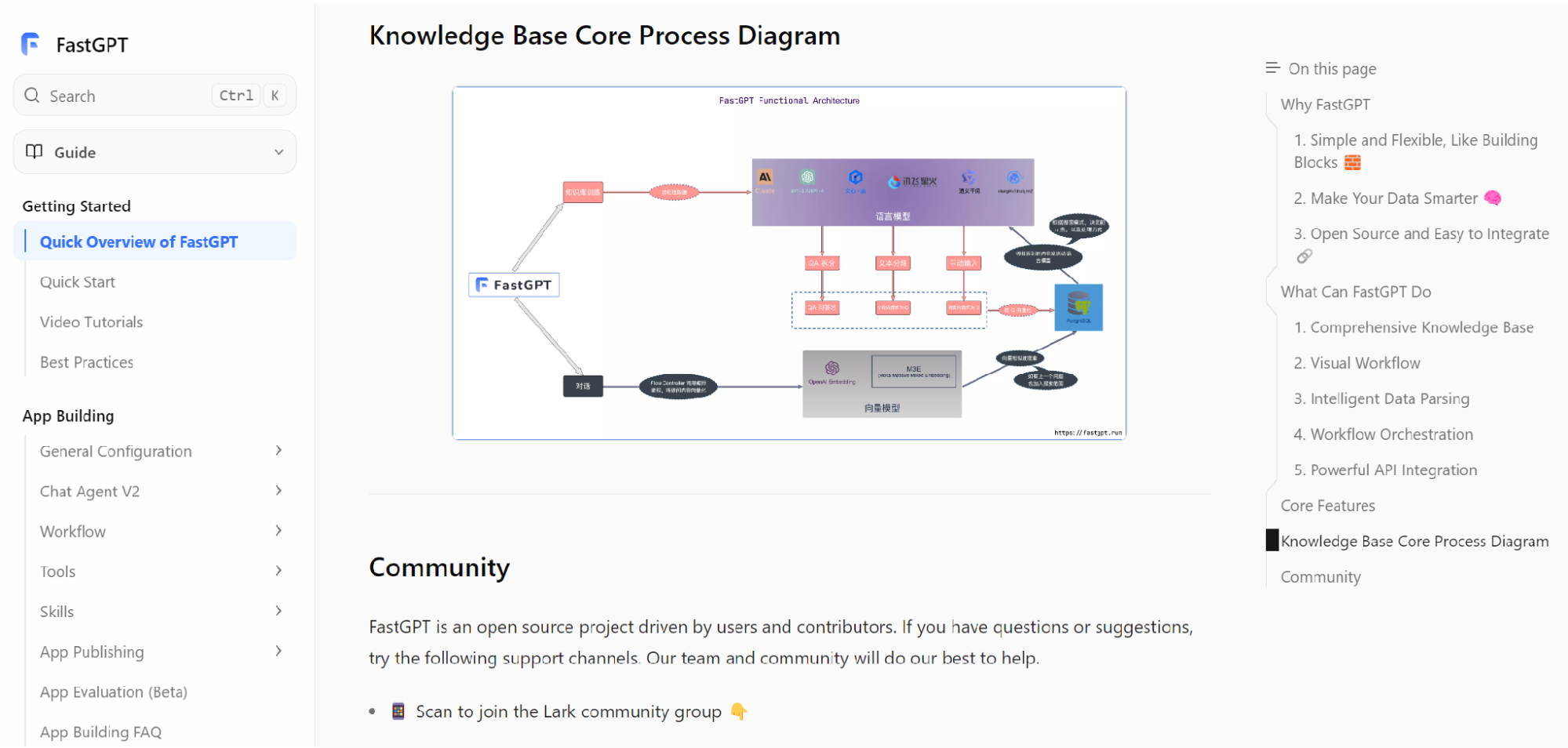
FastGPT's official documentation can help teams understand how knowledge applications are structured beyond a basic RAG chain. During evaluation, IT teams should test knowledge base management, retrieval behavior, citations, workflow configuration, permissions, deployment model, and logs.
The goal is not to replace engineering judgment. The goal is to avoid rebuilding every generic layer from scratch when the business needs a usable knowledge application. A platform can shorten the path, but IT still needs to validate production behavior.
Production Notes for IT Teams
IT teams should treat production RAG as a service with dependencies, not a script with a model call. The service depends on document storage, parsing workers, embedding models, vector search, metadata databases, model providers, identity systems, workflow tools, monitoring, and backup infrastructure. Any one of these can become the bottleneck. A production design should identify critical dependencies and define what happens when each one fails.
Release management is another layer that prototypes rarely include. Changing the chunking strategy can affect retrieval. Changing the embedding model can require re-indexing. Changing the generation model can affect answer style, refusal behavior, and structured outputs. Updating documents can change citations. Adding a workflow can introduce new permission risks. IT teams should create a staging process for these changes, especially when the assistant is used by customer service, HR, finance, or operations.
RAG systems also need incident response. If users report a harmful answer, the team should know how to trace the interaction, identify the retrieved sources, disable a problematic document, update the knowledge base, and communicate the fix. If a model provider is unavailable, the assistant should have a fallback behavior. If retrieval latency rises, monitoring should reveal whether the issue is database load, vector search, network delay, or model response time.
Security review should be repeated as the system grows. A prototype may use harmless documents and a small user group. Production may add confidential knowledge, more departments, customer data, and internal tools. Each expansion changes the risk profile. IT teams should not assume that the original approval covers every future use case. A lightweight review process for new knowledge domains and workflows keeps the system from drifting into unsafe territory.
The final production addition is documentation for administrators and business owners. Users need to know what the assistant is intended to answer. Editors need to know how to update content. Reviewers need to know how to inspect failures. Operators need to know how to restart services and restore backups. The system should not depend on one engineer remembering how everything works. Production readiness means the organization can operate the system even when the original prototype team moves on.
IT teams should also plan capacity from real behavior. A prototype may have one tester, a small document set, and no concurrent load. Production may include multiple departments, larger context windows, batch indexing, workflow calls, and higher expectations for uptime. Measure response latency, retrieval latency, indexing time, storage growth, model errors, and peak concurrency during a controlled pilot. These numbers are more useful than generic infrastructure guesses.
Another production addition is change approval. Not every prompt edit, document upload, or workflow change needs a formal committee, but high-impact changes should be reviewed. If the assistant is customer-facing, changes to answer behavior may affect brand and support quality. If it handles HR, finance, or security content, changes may affect compliance. A lightweight approval process protects the system without slowing every small improvement.
Finally, IT should define expansion gates. The system should not automatically move from one successful use case to every department. Expansion should require evidence: retrieval quality, permission safety, business value, content ownership, and operational readiness. These gates keep the RAG system from becoming a broad but fragile internal experiment.
Common Production Mistakes to Avoid
One common mistake is treating the vector database as the whole product. Vector search is important, but users need a complete application: document management, retrieval controls, citations, permissions, logs, workflows, and feedback. A strong index with weak governance still produces unreliable outcomes.
Another mistake is over-automating too early. Teams may want the assistant to trigger actions, update records, or make decisions as soon as the prototype works. Production systems should earn autonomy gradually. Start with retrieval, drafting, summarization, and human-approved workflows. Add higher-impact actions only when permissions, logs, and error handling are proven.
A third mistake is failing to measure refusal behavior. Many teams measure only correct answers. But a production assistant also needs to know when not to answer. If the evidence is missing, outdated, or outside the user's permission boundary, the assistant should refuse or escalate. Reliable refusal is a production feature, not a model limitation.
Finally, avoid building a system that only the original developer can operate. RAG production requires repeatable procedures. If administrators cannot update knowledge, business owners cannot review failures, and IT cannot monitor health, the system will not scale. Production readiness means the organization can keep the assistant useful after the prototype team moves on.
Teams should also avoid measuring success only by launch date. A RAG system that launches quickly but cannot be trusted will create more support work later. Better production metrics include answer accuracy, citation usefulness, time saved, permission safety, operational stability, and the speed with which bad answers are corrected. These metrics keep the project focused on durable value.
Final Takeaway
Moving from a RAG prototype to production requires more than better prompts. IT teams need knowledge governance, permissions, retrieval evaluation, citations, observability, data boundaries, workflow safety, and operational ownership. These layers turn a demo into a dependable system.
The safest path is staged. Prove one use case, test with real questions, inspect retrieval, validate permissions, measure business value, and expand only when the operating model works. RAG is a powerful foundation, but production value comes from everything built around it.